



Due Date: March 15
Well, so, your buiness card wasn't the biggest smash hit like you'd hoped. Or, perhaps it was. Either way, times change because experiences change, attitudes change, skill-sets change and trends definitely change.
So, time to change some things up.
For this project, we are revisiting your business card. Only, it's time to employ some more skills to our product.
We want to keep our original business cards preserved (the Illustrator versions) so we need to replicate our designs so we don't disrupt the integrity of our originals.
The best way to do this is to open your original business cards in Illustrator. Immediately do a Save As and name the file "Business Cards - Revisited."
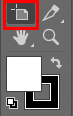
Now, duplicate your Artboards, creating a whole new set of your original cards. To accomplish this, select the Artboard tool on the tool bar, then (while holding the Alt key) select your business card artboard and drag it to anywhere in a space that is not your original card space.
On your business cards (both off them) you will demonstrate the following:
- an example of Brush Stroke
- an example of Swatch Pattern
- an example of Rotate


STEL 7 Design in Technology and Engineering Education
7H Illustrate that there are multiple approaches to design
7I: Apply the technology and engineering design process
7L: Apply universal principles and elements of design
7N: Practice successful design skills
7O: Apply tools, techniques, and materials in a safe manner as part of the design process
7Q: Apply the technology and engineering design process
7R: Refine design solutions to address criteria and constraints
7V: Improve essential skills necessary to successfully design.
7Y: Optimize a design by addressing desired qualities within the criteria and constraints
7BB: Implement the best possible solution to a design
7CC: Apply a broad range of design skills to their design process
7DD: Apply a broad range of making skills to their design process
STEL 8: Applying, Maintaining, and Assessing Technological Products and Systems
8J: Use devices to control technological systems
8N: Use various approaches to communicate processes and procedures for using, maintaining, and assessing technological products and systems
